GRAPHIC DESIGN CAREER ROADMAP IN 2026
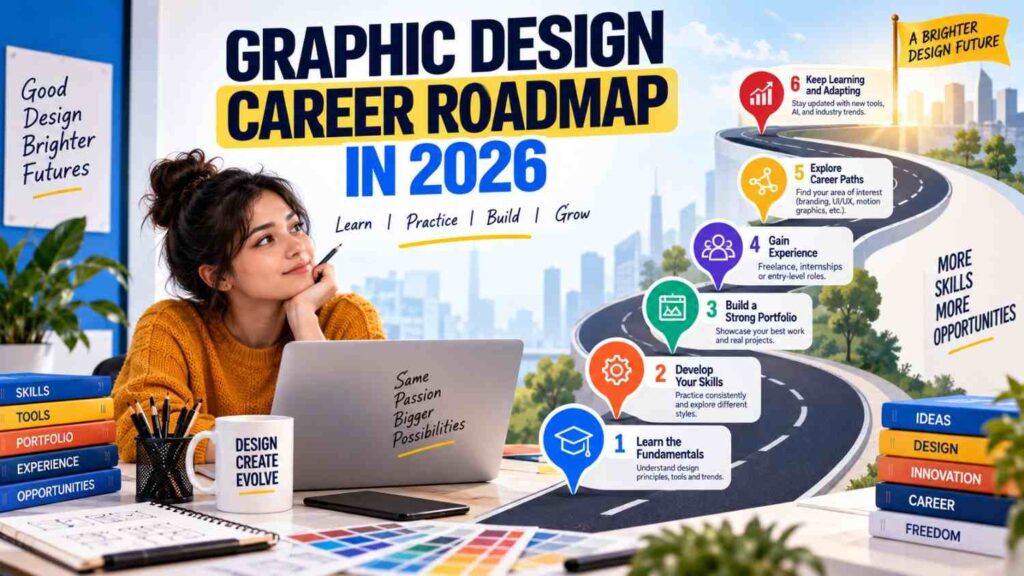
Starting a career in graphic design can feel confusing when you are not sure what to learn first, which software matters, or how to get your first job. A clear GRAPHIC DESIGN CAREER ROADMAP IN 2026 can help students, beginners, freelancers, and career changers understand the skills and steps needed to move forward.Graphic design has changed significantly. Designers are no longer limited to posters, brochures, and printed advertisements. Modern designers work on social media content, brand identities, websites, presentations, digital advertisements, packaging, user interfaces, videos, and many other visual communication projects.At the same time, artificial intelligence is becoming part of professional design workflows. Current industry research shows that AI skills are appearing more frequently in creative job requirements, while human creativity, judgment, and creative direction remain important.This makes a structured GRAPHIC DESIGN CAREER ROADMAP IN 2026 useful for anyone who wants to build relevant skills and create a sustainable creative career.
What Is a Graphic Design Career Roadmap?
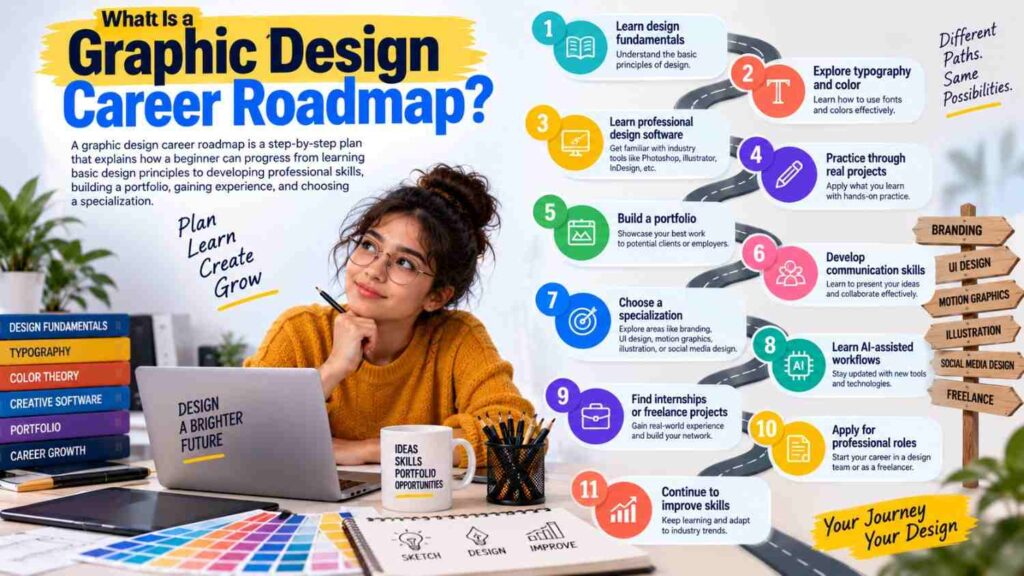
A graphic design career roadmap is a step-by-step plan that explains how a beginner can progress from learning basic design principles to developing professional skills, building a portfolio, gaining experience, and choosing a specialization.
A typical journey may include:
- Learning design fundamentals
- Understanding typography and color
- Learning professional design software
- Practicing through real projects
- Building a portfolio
- Developing communication skills
- Choosing a design specialization
- Learning AI-assisted workflows
- Finding internships or freelance projects
- Applying for professional roles
- Continuing to improve skills
Following a roadmap does not mean every designer has to follow exactly the same career path. Some people may move into branding, while others may prefer UI design, motion graphics, illustration, social media design, or freelance work.
Step 1: Understand Graphic Design Fundamentals
The first stage of the GRAPHIC DESIGN CAREER ROADMAP IN 2026 is learning the fundamentals.Software can help you create a design, but software knowledge alone does not make someone a strong designer. You need to understand why certain design choices work.
Start by learning:
- Layout
- Composition
- Typography
- Color theory
- Contrast
- Alignment
- Balance
- Hierarchy
- White space
- Proportion
- Visual flow
These principles help you organize information and create designs that are easier to understand.For example, a social media poster may contain a headline, image, supporting information, and a call to action. Without hierarchy, everything may appear equally important. With proper hierarchy, viewers can quickly understand the main message.Therefore, fundamentals should come before advanced effects and complicated techniques.
Step 2: Learn Essential Graphic Design Software
Once you understand the basics, the next stage is learning design software.Professional designers may use different tools depending on their specialization. Common software includes Photoshop, Illustrator, InDesign, Figma, Canva, and other creative applications.Adobe identifies image editing, vector design, layout, publishing, and motion as important areas within modern creative workflows.
Photoshop
Photoshop is useful for:
- Photo editing
- Image manipulation
- Social media graphics
- Digital artwork
- Advertising creatives
- Web graphics
Illustrator
Illustrator is particularly useful for:
- Logos
- Icons
- Vector illustrations
- Brand elements
- Packaging graphics
- Scalable artwork
InDesign
InDesign can be useful for:
- Brochures
- Magazines
- Books
- Catalogues
- Reports
- Multi-page documents
Figma
Figma is widely used for digital interface and collaborative design workflows.
Canva
Canva can be useful for quickly creating social media graphics, presentations, simple marketing materials, and other visual content.You do not need to master every tool at the beginning. Choose the software that matches your immediate goals and gradually expand your skills.
Step 3: Practice Through Real Design Projects
Watching tutorials is useful, but practice is where your skills begin to develop.Create your own projects instead of only copying tutorial examples.
For example, you could create:
- A fictional restaurant logo
- A brand identity
- A social media campaign
- A product advertisement
- A YouTube thumbnail
- A magazine cover
- A promotional poster
- A packaging concept
- An infographic
- A mobile app interface
Give yourself a design brief before starting.
Ask:Who is the audience?
What is the purpose?What message should the design communicate?Which visual style suits the project?This approach teaches you to solve design problems rather than simply decorate a page.
Step 4: Develop Typography and Color Skills
Typography and color are two major parts of professional visual communication.Beginners often make the mistake of selecting fonts simply because they look attractive. Instead, fonts should support the message and overall design.
Learn about:
- Font families
- Font pairing
- Font hierarchy
- Font size
- Line spacing
- Letter spacing
- Readability
- Text alignment
Color also requires thoughtful decisions.Learn how colors interact and how different combinations can influence visual perception.
Practice creating:
- Monochromatic palettes
- Complementary palettes
- Analogous palettes
- Neutral palettes
- Brand color systems
A strong understanding of typography and color can make even a simple design appear much more organized and intentional.
Step 5: Build a Professional Portfolio
A portfolio is one of the most important stages in the GRAPHIC DESIGN CAREER ROADMAP IN 2026.Employers and clients need to see what you can actually create.
Your portfolio can include:
- Logo designs
- Brand identity projects
- Social media creatives
- Posters
- Packaging
- UI designs
- Advertisements
- Illustrations
- Presentation designs
- Personal projects
Quality is more important than filling your portfolio with dozens of unrelated designs.
For each major project, explain:
- The design problem
- Your concept
- Your design decisions
- The tools you used
- The final outcome
This gives viewers an understanding of your thinking process instead of showing only the final image.
Step 6: Choose a Graphic Design Specialization
As you gain experience, consider choosing an area of specialization.Graphic design offers several possible career directions.
Brand Designer
Brand designers work with logos, visual identities, typography, colors, brand guidelines, and related visual systems.
Social Media Designer
Social media designers create visual content for platforms such as Instagram, Facebook, LinkedIn, and other digital channels.
UI Designer
UI designers focus on visual interfaces for websites, applications, and digital products.
Motion Graphics Designer
Motion designers combine graphic design with animation and movement to create engaging visual content.
Packaging Designer
Packaging designers develop visual concepts for products and their physical packaging.
Illustration Designer
Illustrators create original artwork for publishing, advertising, branding, digital content, and other applications.
Visual Designer
Visual designers often work across digital and branding projects, combining graphic design principles with broader visual communication.
You do not have to choose a specialization immediately. Explore different areas first and identify the type of work you enjoy most.
Step 7: Learn AI-Assisted Design Workflows
One of the biggest changes to consider in the GRAPHIC DESIGN CAREER ROADMAP IN 2026 is artificial intelligence.
AI is becoming part of creative workflows rather than existing completely separately from traditional design tools. Adobe’s 2026 research found that explicit AI requirements in creative job postings increased between its September 2025 and April 2026 datasets.This does not mean that learning traditional design fundamentals is unnecessary.Instead, designers should learn how to use AI responsibly alongside their existing skills.
AI can assist with:
- Idea generation
- Concept exploration
- Image variations
- Background creation
- Repetitive tasks
- Creative experimentation
- Early-stage visual exploration
However, designers still need to evaluate the results.A generated visual may have technical or conceptual problems. A designer must understand composition, branding, typography, audience expectations, and visual communication to decide whether the output is actually useful.Therefore, learn AI as a creative assistant, not as a replacement for design thinking.
Step 8: Develop Communication and Client Skills
Graphic design is not only about creating attractive visuals.Professional designers communicate with clients, marketing teams, developers, writers, photographers, business owners, and other professionals.
Important soft skills include:
- Communication
- Time management
- Listening
- Presentation
- Problem-solving
- Organization
- Receiving feedback
- Explaining design decisions
- Managing revisions
For example, a client may say that a design “does not feel right.” Instead of becoming frustrated, a professional designer should ask useful questions and identify what needs to change.Good communication can prevent unnecessary revisions and make projects easier to manage.
Step 9: Gain Practical Experience
After developing basic skills and creating a portfolio, start looking for practical experience.
You can explore:
- Internships
- Junior design positions
- Freelance projects
- Student projects
- Volunteer projects
- Personal brand projects
- Small-business projects
- Agency opportunities
Do not wait until you feel completely ready.Small projects can teach you important lessons about deadlines, feedback, revisions, file management, and client expectations.Freelancing can also provide experience while helping you build a professional network. Remote work has expanded opportunities for designers to collaborate with clients and teams beyond their immediate location.
Step 10: Apply for Entry-Level Graphic Design Roles
Once you have foundational skills, software knowledge, and a portfolio, begin applying for suitable roles.
Possible entry-level titles include:
- Junior Graphic Designer
- Graphic Designer
- Visual Designer
- Production Designer
- Social Media Designer
- Junior Brand Designer
- UI Designer
- Creative Designer
Read job descriptions carefully before applying.Different employers may expect different skills. Some roles may focus on branding, while others may require social media design, digital advertising, UI work, video editing, or motion graphics.Do not apply only because the job title contains “Graphic Designer.” Check the actual responsibilities and required skills.
Skills That Matter Most in 2026
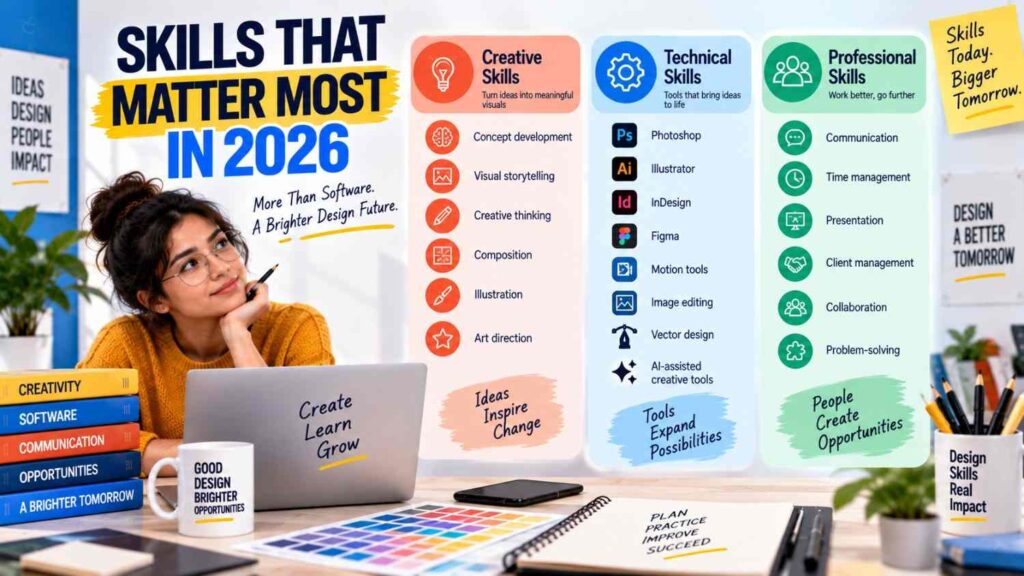
The modern GRAPHIC DESIGN CAREER ROADMAP IN 2026 should include a combination of creative, technical, and professional skills.
Creative Skills
- Concept development
- Visual storytelling
- Creative thinking
- Composition
- Illustration
- Art direction
Technical Skills
- Photoshop
- Illustrator
- InDesign
- Figma
- Motion tools
- Image editing
- Vector design
- AI-assisted creative tools
Professional Skills
- Communication
- Time management
- Presentation
- Client management
- Collaboration
- Problem-solving
Current industry guidance continues to emphasize both hard and soft skills rather than software knowledge alone.
Conclusion
A successful GRAPHIC DESIGN CAREER ROADMAP IN 2026 is not simply about learning design software. It is about developing the ability to communicate ideas visually, solve creative problems, work with people, understand modern tools, and continuously improve.Start with fundamentals. Learn essential software. Practice regularly. Build a strong portfolio. Gain practical experience. Choose a specialization when you are ready. Most importantly, stay adaptable as technology changes.AI and new creative tools may continue to reshape the industry, but strong design thinking, human judgment, storytelling, and communication remain valuable parts of professional creative work.If you follow these steps consistently, your journey from beginner to professional designer becomes much clearer and more manageable.Improve your understanding of graphic design fundamentals and visual communication by exploring the Nielsen Norman Group’s design resources .