How to Build a Graphic Design Portfolio That Gets You Hired
A strong portfolio is one of the most valuable assets for anyone pursuing a career in graphic design. While resumes list qualifications and experience, a portfolio demonstrates your creativity, technical skills, and ability to solve real-world design challenges. If you’re wondering How to Build a Graphic Design Portfolio, creating a well-organized collection of your best work is the first step toward attracting employers, freelance clients, and exciting career opportunities.
Whether you’re a student, a beginner, or someone looking to transition into the design industry, understanding How to Build a Graphic Design Portfolio will help you stand out in a competitive job market. Employers often evaluate portfolios before reviewing resumes because they want to see practical skills rather than just academic achievements.
Joining a professional Graphic Design Course gives aspiring designers the opportunity to work on live projects, receive expert feedback, and create industry-standard portfolio pieces. At D Plus Academy, students develop professional portfolios through practical assignments, branding projects, social media designs, and real-world creative work that prepares them for successful careers.
Why Is a Graphic Design Portfolio Important?
Before learning How to Build a Graphic Design Portfolio, it’s important to understand why every designer needs one.
A portfolio is more than a collection of images. It tells the story of your creativity, design thinking, and ability to solve communication problems through visuals.
A professional portfolio helps you:
- Showcase your creativity
- Demonstrate technical skills
- Build credibility
- Impress recruiters
- Win freelance projects
- Establish personal branding
- Increase job opportunities
Many employers value an impressive portfolio even more than formal qualifications.
What Should a Graphic Design Portfolio Include?
Understanding How to Build a Graphic Design Portfolio starts with knowing what employers and clients expect to see.
Your portfolio should include projects that demonstrate versatility, creativity, and attention to detail.
Recommended sections include:
- Logo Design
- Brand Identity
- Social Media Creatives
- Marketing Posters
- Brochures
- Packaging Design
- Website Banners
- UI Design Concepts
- Infographics
- Personal Creative Projects
Every project should reflect your design process and problem-solving skills.
Start with Your Best Work
One common mistake beginners make while learning How to Build a Graphic Design Portfolio is including every design they have created.
Quality always matters more than quantity.
Instead of adding dozens of average projects, showcase your strongest work.
Choose projects that demonstrate:
- Creativity
- Typography
- Color theory
- Layout design
- Branding
- Visual storytelling
- Attention to detail
A portfolio containing 10–15 excellent projects is often more effective than one with 40 average designs.
Include Different Types of Design Projects
Employers appreciate designers who can work across multiple formats.
Your portfolio should demonstrate versatility by including different design categories.
Branding Projects
Include:
- Logos
- Brand guidelines
- Business cards
- Letterheads
- Brand color palettes
These projects demonstrate your understanding of visual identity.
Social Media Designs
Businesses constantly require engaging social media content.
Include examples such as:
- Instagram posts
- Facebook advertisements
- LinkedIn banners
- Story templates
- Promotional campaigns
These projects show your understanding of digital marketing.
Print Design
Print materials remain important for many businesses.
Examples include:
- Flyers
- Posters
- Brochures
- Catalogues
- Event banners
These projects highlight layout and typography skills.
Digital Advertising
Display your ability to create:
- Google Display Ads
- Website banners
- Landing page graphics
- Promotional creatives
These projects demonstrate commercial design skills.
Show Your Design Process
One of the most overlooked aspects of How to Build a Graphic Design Portfolio is explaining your design decisions.
Instead of simply displaying finished artwork, explain:
The Client or Project Goal
Describe what problem needed solving.
Your Research
Explain how you gathered inspiration and understood the target audience.
Design Development
Show sketches, mood boards, wireframes, or early concepts.
Final Outcome
Present the completed design and explain how it meets the project objectives.
This approach demonstrates professional thinking rather than just artistic ability.
Build Personal Branding Through Your Portfolio
Your portfolio should reflect your own design style and personality.
Include:
- Professional profile
- Personal logo (optional)
- Designer bio
- Contact information
- Social media links
- Portfolio website
Consistent branding makes your portfolio more memorable.
Learn Industry-Standard Design Software
A professional portfolio should showcase work created using widely accepted design tools.
These include:
- Adobe Photoshop
- Adobe Illustrator
- Adobe InDesign
- Figma
- Adobe XD
- Canva (for selected projects)
Employers often expect familiarity with multiple design applications.
Organize Your Portfolio Professionally
A cluttered portfolio creates a poor impression.
Organize projects into logical categories such as:
- Branding
- Print Design
- Social Media
- UI Design
- Advertising
- Personal Projects
Provide short project descriptions so viewers understand the purpose behind each design.
Focus on Quality Presentation
Presentation matters almost as much as the designs themselves.
When learning How to Build a Graphic Design Portfolio, pay attention to:
- Consistent spacing
- Clean layouts
- High-resolution images
- Easy navigation
- Professional typography
- Balanced color usage
A well-presented portfolio reflects professionalism and attention to detail.
Gain Real-World Experience
Practical experience strengthens your portfolio significantly.
Consider working on:
- Student assignments
- Practice branding projects
- Non-profit organizations
- Local businesses
- College events
- Personal creative challenges
- Mock client briefs
Real-world projects demonstrate your ability to solve practical design problems and prepare you for professional opportunities.
Common Mistakes to Avoid While Building a Graphic Design Portfolio
Understanding How to Build a Graphic Design Portfolio also means knowing what mistakes can reduce your chances of getting hired. Many talented designers miss opportunities because their portfolios fail to showcase their skills effectively.
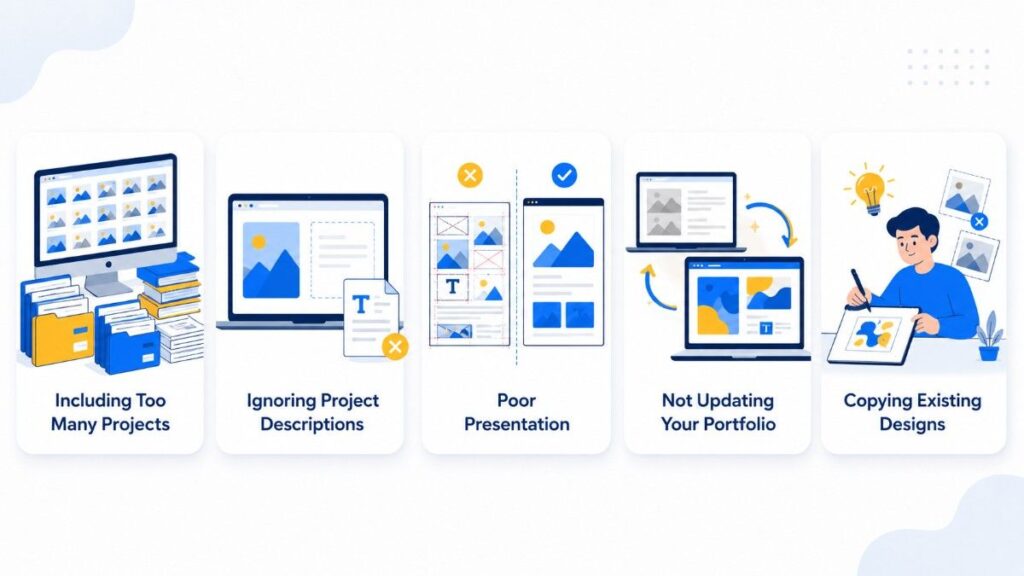
Including Too Many Projects
A common mistake is adding every design you’ve ever created. Recruiters prefer a focused portfolio with your strongest work rather than a large collection of average designs.
Ignoring Project Descriptions
Simply displaying images isn’t enough. Explain the project’s objective, target audience, your creative process, and the final outcome. This demonstrates your problem-solving abilities and design thinking.
Poor Presentation
Even great designs can lose impact if the portfolio looks cluttered. Maintain consistent spacing, typography, and image quality to create a professional appearance.
Not Updating Your Portfolio
Your portfolio should evolve as your skills improve. Replace older projects with stronger, more recent work that reflects your current abilities.
Copying Existing Designs
Employers value originality. While inspiration is helpful, your portfolio should showcase your own creative ideas and unique design style.
Should You Create an Online Portfolio or a PDF Portfolio?
When learning How to Build a Graphic Design Portfolio, many beginners ask whether they should use an online portfolio or a PDF.
Online Portfolio
An online portfolio is highly recommended because it is easy to share and accessible from anywhere.
Benefits include:
- Professional online presence
- Easy sharing with recruiters
- Mobile accessibility
- Better personal branding
- Continuous updates
- Improved visibility
Popular portfolio platforms include:
- Behance
- Adobe Portfolio
- Dribbble
- Personal Website
PDF Portfolio
A PDF portfolio is still useful, especially for interviews and email applications.
Advantages include:
- Easy to download
- Works offline
- Professional presentation
- Convenient for recruiters
Many designers maintain both an online portfolio and a PDF version for maximum flexibility.
Where Should You Showcase Your Portfolio?
Creating a portfolio is only the beginning. Knowing where to showcase it is equally important.
Consider sharing your work on:
- Behance
- Dribbble
- Personal Website
- Freelancing Platforms
- Portfolio Communities
Sharing your work regularly increases visibility and opens new career opportunities.
How Freelancing Helps Build Your Portfolio
Freelancing is an excellent way to strengthen your portfolio while gaining practical experience.
You can work on projects such as:
- Logo design
- Social media graphics
- Business branding
- Website banners
- Marketing materials
- Event posters
Freelancing helps you:
- Work with real clients
- Improve communication skills
- Learn project management
- Build confidence
- Expand your portfolio
Even small freelance projects can significantly improve your professional profile.
Keep Improving Your Portfolio
Learning How to Build a Graphic Design Portfolio is not a one-time task. Professional designers continuously improve their portfolios throughout their careers.
Update your portfolio by:
- Replacing older work
- Adding recent client projects
- Including award-winning designs
- Showcasing new software skills
- Following current design trends
A regularly updated portfolio reflects continuous learning and professional growth.
Why Choose D Plus Academy?
Choosing the right training institute plays a major role in learning How to Build a Graphic Design Portfolio successfully.
At D Plus Academy, students receive practical, industry-oriented training designed to prepare them for real careers in graphic design.
Students benefit from:
- Industry-focused Graphic Design Course
- Hands-on practical sessions
- Live client projects
- Portfolio development guidance
- Internship opportunities
- Expert mentorship
- Placement assistance
- Career-focused training
The academy emphasizes practical learning, ensuring students graduate with a professional portfolio that demonstrates real-world design skills and creativity.
Professional Tips for Building an Outstanding Portfolio
Follow these expert recommendations:
- Showcase quality over quantity.
- Include only your best projects.
- Explain the story behind every design.
- Demonstrate creativity and problem-solving.
- Use professional mockups.
- Keep the design clean and organized.
- Highlight different design categories.
- Update your portfolio regularly.
- Build your personal brand.
- Continue learning new design tools and trends.
These practices help create a portfolio that attracts recruiters, clients, and employers.
Conclusion
Understanding How to Build a Graphic Design Portfolio is one of the most important steps toward becoming a successful graphic designer. A well-crafted portfolio showcases your creativity, technical expertise, design thinking, and ability to solve real-world communication challenges. More than just displaying artwork, an effective portfolio tells the story behind each project and demonstrates how you approach branding, typography, layout, color theory, and visual problem-solving.
Whether you plan to work for a company, join a creative agency, or become a freelance designer, your portfolio is often the first impression you make on potential employers and clients. Investing time in creating professional projects, organizing them effectively, and updating your portfolio regularly will significantly improve your career opportunities. As businesses continue investing in branding, digital marketing, website design, and visual communication, skilled graphic designers remain in high demand. By learning How to Build a Graphic Design Portfolio, continuously improving your skills, and presenting your work professionally, you can create a portfolio that opens doors to rewarding career opportunities.
To explore professional design resources and industry best practices, visit Adobe Creative Cloud Learn.